Community

Your first day

We hope you and your child are excited to be joining our Lumio school community, where a world of learning awaits.

Where to go

If you are starting on the first day or joining after the academic year has began, please visit our Main Office Reception, where our team will be on hand to assist you.

Visitor Policy: To comply with our Fire and Safety regulations: All visitors and parents are required to sign in at Reception upon arrival and sign out upon leaving the school premises.
Your child's wellbeing

At Lumio Private School, we recognise that wellbeing is not a given—it’s something that requires care and attention, much like physical health. Our holistic approach prioritises the mental health of everyone in our school community, including students, parents, and staff.

We are dedicated to fostering a culture of mental health awareness, free from stigma or discrimination. Through high-quality mental health training and a commitment to inclusivity, we ensure that all members of our community feel supported and understood.

From the earliest years, mental health education has been an integral part of our pastoral care. Our staff are equipped to nurture students’ mental wellbeing in every interaction—whether in the classroom, at lunch, or during co-curricular activities.

By working together, we strive to create a supportive environment where everyone can thrive, with wellbeing at the heart of everything we do.

Primary Daily Timetable

The Primary entrance opens at 07:45 and closes at 08:10, pupils must go to the Main Office Reception to be registered. Pupils will be marked as Late after 08:15.

TimePeriod
07:45School gates open
08:10School gates close
08:10Students to Main Office Reception for registration
08:00 - 08:15Homeroom Registration / Activity
08:15 - 09:05Period 1 / SPAG / Phonics
09:05 - 09:55Period 2 Maths
09:55 - 10:20Break
10:20 - 11:10Period 3
11:10 - 12:00Period 4
12:00- 12:50Lunch
12:50 - 13:40Period 5
13:40 - 14:30Period 6
14:40 - 17:00ASPs Begin

Secondary Daily Timetable

The Secondary entrance opens at 07:45 and closes at 08:00. Late pupils must report to the Main office Reception to be registered.

TimePeriod
07:45 School gates open
08:10Gates Close
08:00 - 08:10Registration
08:10 - 08:15Transition
08:15 - 09:05Period 1
09:05 - 09:10Transition
09:10 - 10:00Period 2
10:00 - 10:20Break
10:20 - 11:10Period 3
11:10 - 11:15Transition
11:15 - 12:05Period 4
12:05 - 12:50Lunch
12:50 - 13:40Period 5
13:40 - 13:45Transition
13:45 - 14:35Period 6
14:35 - 14:40Transition
14:40 - 15:30Period 7
15:30 - 18:00ASPs

Morning Drop-Off & Afternoon Pick-Up Procedures

07:45 – The primary and secondary school entrances open. 

08:00 – Secondary Entrance closes (go to Main Office Reception – Pupils are marked as late)

08:10 – Primary Entrance closes (go to Main Office Reception – Pupils are marked as late after 08:15)

08:00 – 08:15 – Registration / PHE

Late Pupils will receive a slip from the Reception staff to present to their teacher for system registration.

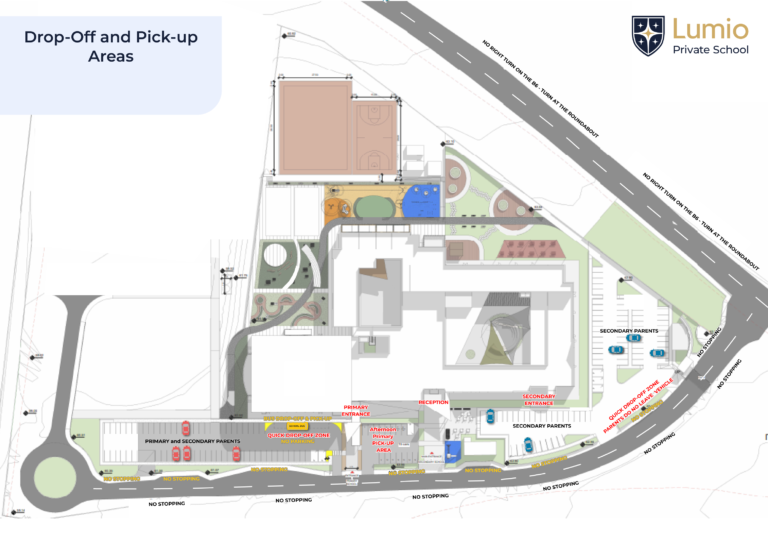
Please note that for safeguarding purposes, parents are not allowed to come into school.  Pupils can be dropped off at the gates and walk to their classrooms.

PRIMARY 

Parking: This is the area to the left of the primary building.

Morning Drop-off:

  • Park and walk your child to the Primary School Entrance Gate.
  • If they are able to walk on their own to the gate, you are welcome to use the Drop-off Zone.
  • Pupils will make their own way to their classrooms.
  • If assistance is required, a member of staff will accompany them.

Afternoon Pick up:

  • Park and pick your child up from the designated Grade Assembly Point.
  • Designated Assembly Point: Grades 1 to 5 at the open area to the right of the Primary Entrance.
  • A member of staff will be available to assist at all times.

Please note: If another guardian (friend, relative, driver) is picking your child up from school:

The parent/guardian must notify the school in advance by emailing reception at info@lumio.school.
The Main Office Reception will then inform the homeroom teacher and relevant staff members.
The authorised adult collecting the child must report to reception and sign the pupil out in the pick-up book before leaving the school premises.

Once the sign-out process has been completed, reception will issue a pick-up slip to the authorised adult. This slip confirms that the child has been officially signed out and authorised for collection.
The authorised adult must keep the slip with them and hand it to the homeroom teacher or ASP teacher when collecting the child.

SECONDARY

Parking: This is the area to the right of the secondary building.

Morning Drop-off & Afternoon Pick up:

  • Secondary pupils can walk in and out of the Secondary Entrance on their own.
Please note the speed limit on site is 20 km/h.

DROP-OFF ZONES

If you do not want to park, you may use the clearly marked drop-off zones. Please ensure your child is ready to exit the vehicle quickly to avoid delays and ensure the smooth flow of traffic.

DO NOT park:

  • on the main road leading to the Primary and Secondary parking areas,
  • in the drop-off zones, or
  • the Bus zones.

Thank you for your cooperation in following these guidelines, which help us maintain a safe and organised environment for all students and staff.

Attendance and Daily registration

Arriving at school on time allows your child to settle before class starts, to catch-up with their friends and creates a routine allowing them to feel settled.

Late students must go to the Main Office Reception to be registered by our office staff. This is a safeguarding requirement.

  • 08:00 to 08:15 – Class registration / PHE lessons.
  • 08:00 – Secondary Gate closes – pupils arriving after this time are LATE (Go to Main Office Reception)
  • 08:10 – Primary Gate closes  – pupils arriving at this time go to the Main Office Reception (Pupils are marked as Late after 08:15)

Late Arrivals

  • It is the requirement of the Ministry of Education, Youth and Sport (MOE&S) for parents to complete a Pupil Attendance Slip (Late) – these are available at the Main Office Reception to complete on the day.
  • Students will receive a Late Slip to give to their Homeroom teacher. This ensures that all teachers are aware that students have been registered for safeguarding purposes.

Sick or Leaving Early

If your child is sick, or leaving early, please email the details to the Main Office Reception on info@lumio.school and add this to Managebac/Attendance  (The Academic App) and the bus company (if they are regstered to take the bus).

  • Pick them up at the Main Office Reception.
  • Complete the Pupil Attendance Slip.

Long Absence requests:

  • Please email info@lumio.school to request longer absences.
  • These will be reviewed by our Head of School.
  • HoS will then communicate with the parent on whether this is approved and the implications of the absence on the students education.
  • Parents to complete the Pupil Attendance Slip.

Late Pick-up and General Safety

Primary Late Pick-up

  • The Homeroom Teacher will inform the reception staff of the late pick-up student’s name and escort them to Flexi-club.
  • Parents arriving after 14:40 or are late picking up their children from an ASP must check in at the Main Office Reception.
  • Parents must pay the late pick-up/supervision fee at this time – these can be found in the school Drop-off and Pick-up Policy on Managebac.

Secondary Late Pick-up

  • Pupils who remain on the school campus after 16:00 and are not signed into the study centre or attending an ASP must report to Main Office Reception.
  • Parents will be charged a late pick-up fee

Our Buddy System

At Lumio, we understand that starting at a new school can be both exciting and challenging. To help every new pupil settle in with confidence, we have a buddy system in both Primary and Secondary.

Primary School
New Primary pupils are paired with a friendly classmate from their year group who can help them feel welcome and comfortable during their first days and weeks at school. Buddies can show new pupils where important areas are, explain daily routines, help them understand classroom expectations, and introduce them to other children. They also provide a familiar face to talk to during break and lunchtime, helping new pupils build friendships and feel part of the school community.

Secondary School
In Secondary, new pupils are paired with an established student who can help them navigate the different routines and expectations of secondary school life. Their buddy can help them find classrooms and key areas around the school, understand the timetable and daily routines, meet other pupils, and become familiar with school procedures and expectations. They can also offer practical support during break and lunchtime and help them make connections within their year group.

Ongoing Support and Wellbeing
The buddy system is supported by our Homeroom Teachers, Counsellor and Wellbeing Team, who regularly check in with the new pupil throughout the transition period. Where necessary, they can provide additional guidance to ensure that each new pupil has a buddy with whom they can establish a comfortable and positive connection.

The buddy system encourages friendship, belonging, confidence, inclusion and responsibility. It gives new pupils someone they can turn to while becoming familiar with their new environment, while also giving existing students the opportunity to demonstrate kindness, leadership and care for others.

Our aim is simple: no pupil should feel like they are navigating a new school alone.

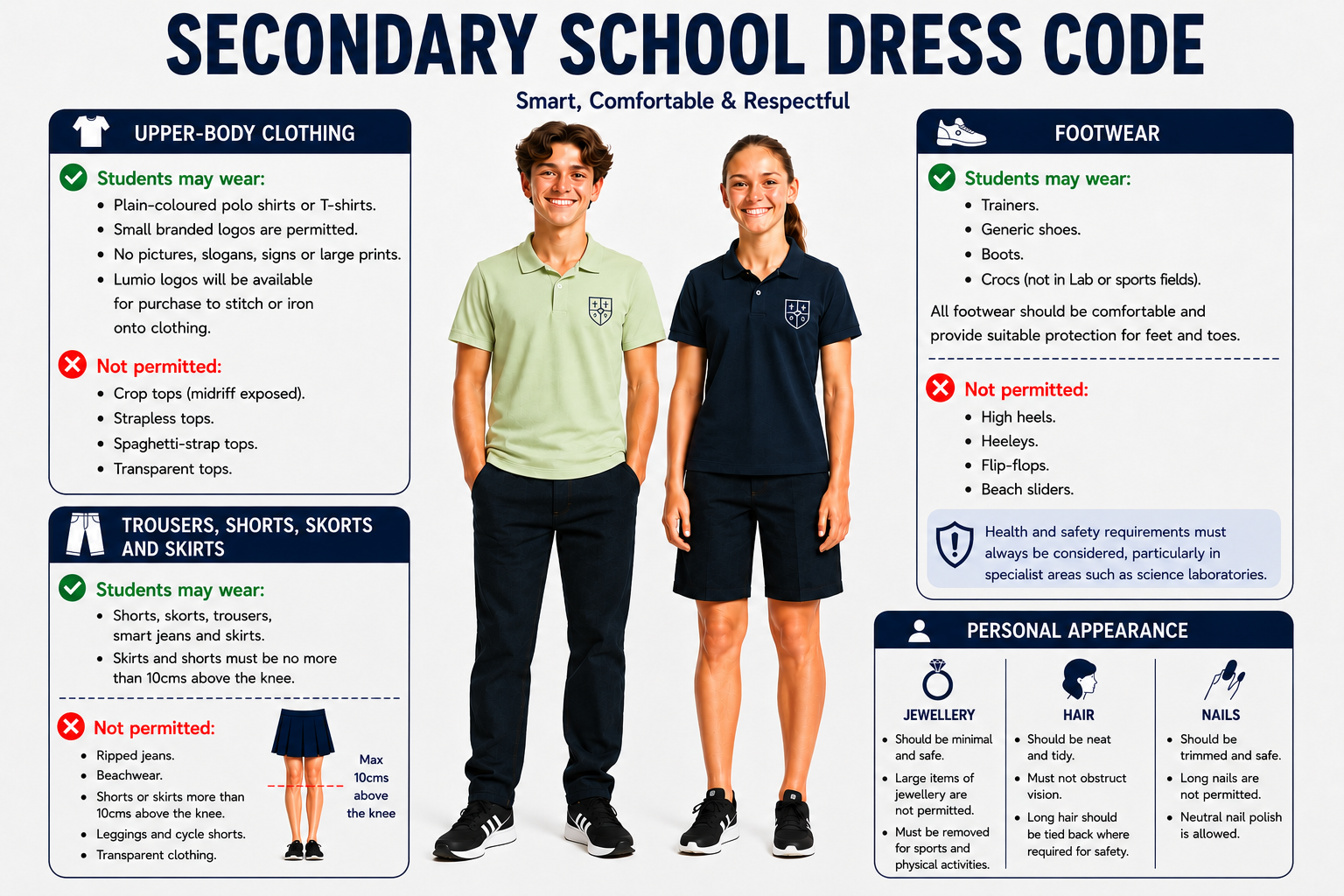
Dress Code

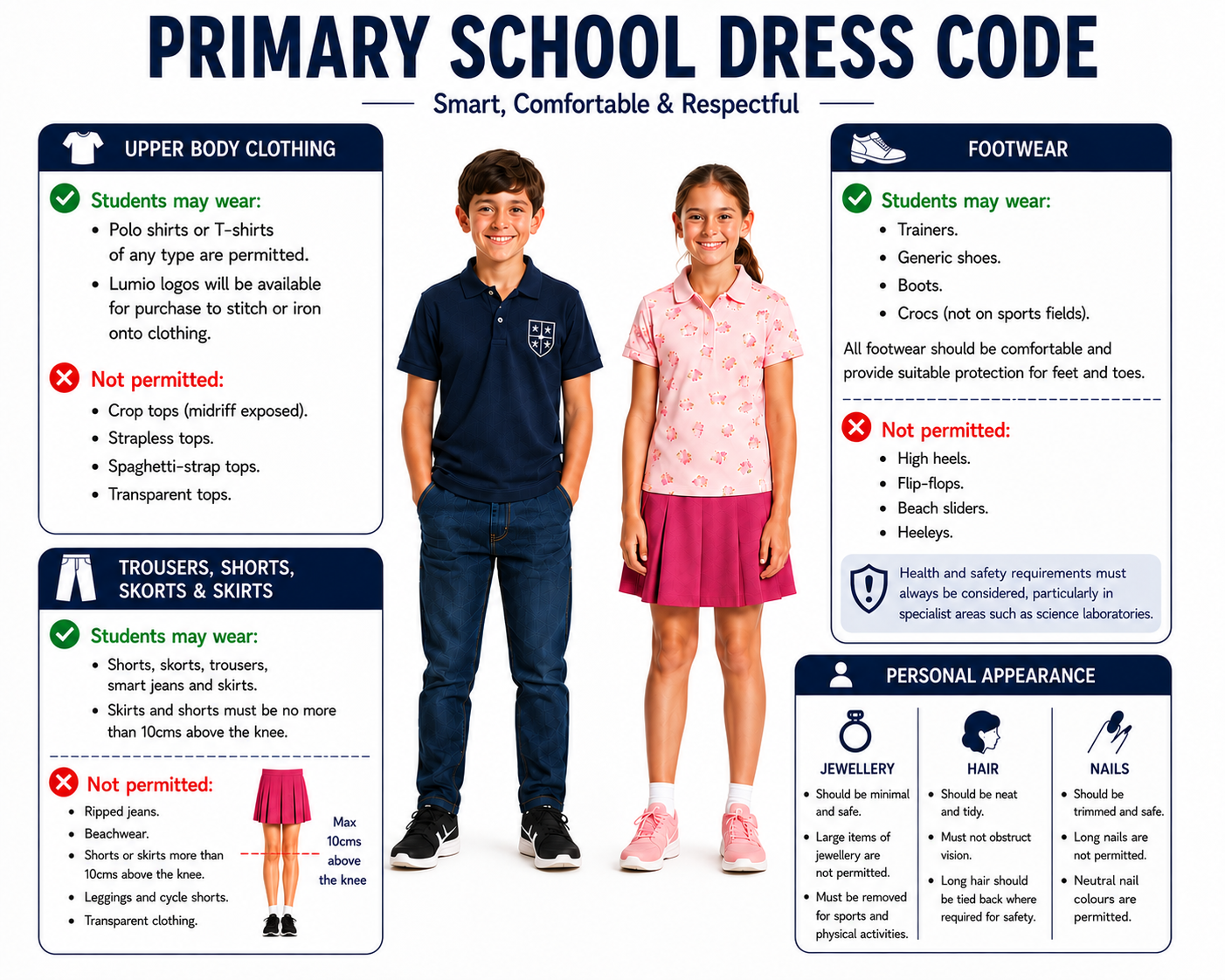
Primary Dress Code
Secondary Dress Code

Physical Education and Sports – All pupils: Clothing must be suitable and safe for the activity. Jewellery must not be worn during sport and physical activities.

Caps – All pupils: Lumio-branded only.

School and House Events

Pupils will be required to wear:

Lumio Navy Polo Shirt for educational trips, assemblies, Open Days, school photographs and other designated events.
Lumio House Colour Polo Shirt for Sports Day and House events.

Non-Dress Code Days

On designated non-dress code days, pupils may wear casual clothing, including printed T-shirts, provided clothing remains appropriate for a school environment and does not compromise health and safety.

Parent and Pupil Responsibility

Parents and pupils share responsibility for ensuring that the Dress Code is followed consistently. Pupils are expected to represent themselves and the school positively through both their behaviour and personal presentation.

The Dress Code Policy can be found on Managebac.

School Branded Clothing

NEW PUPILS will receive a House and Navy Polo shirt when they start with us.

Order your Lumio branded clothing from our web shop or ask at the Main Office Reception.

LUMIO SHOP

Parents can donate old Lumio polo shirts to our preloved shop, and buy extra shirts and kits for your children from our in-school or online shop.

Please consider the environment and upcycle our clothes.

Stationery

The following items are required for parents to purchase, as they are needed for specific subjects and classes:

Grades 1 – 3

  • 2 x pencils (HB)
  • Eraser
  • Pencil sharpener
  • Ruler (30cm)
  • Colouring pencils
  • Glue stick
  • Pencil case

Grades 4 – 5

  • 1 x A4 Notebook
  • 2 x pens (black)
  • 2 x pencils (HB)
  • Eraser
  • Pencil sharpener
  • Ruler (30cm)
  • Glue stick
  • High-lighters
  • Pencil case
  • Protractor and compass set
  • 2 x whiteboard markers (black)
  • Scientific calculator e.g. Casio FX 991EX model or similar

Grades 6 – 11

  • 1 x A4 Notebook
  • 2 x pens (black)
  • 2 x pencils (HB)
  • Eraser
  • Pencil sharpener
  • Ruler (30cm)
  • Glue stick, high-lighters
  • Pencil case
  • Protractor and compass set
  • 2 x whiteboard markers (black)

Grades 11 – DP Specific

Numworks Graphing Calculator – The school has sourced the correct calculators as per IB Diploma guidelines and parents are kindly requested  to purchase them directly from the school at their earliest convenience. Cost = € 90 per calculator.

Managebac and Clipboard Applications

Managebac Application – Academic Platform

Through ManageBac, you can stay informed about your child’s learning, school events, attendance, reports and important announcements.
ManageBac can be accessed from any web browser or by downloading the free ManageBac+ app on your mobile device.

Welcome email – will be sent to parents

  • Once your account has been created by the school, you will receive a Welcome to ManageBac email.

If you do not receive this email, please:

  • Check your Junk or Spam folder.
  • Contact the school to request that the email is sent again.

Activate your account

  • Open the Welcome Email.
  • Click Activate Account.
  • Create your own secure password.
  • Sign in using your email address and the password you have created.
  • Your account is now ready to use.

Choose how you would like to access ManageBac

Option 1 – Web Browser

  • Open your internet browser and visit the school’s ManageBac website.
  • Enter:
    • Your email address
    • Your password

Option 2 – ManageBac+ App

  • Download the free ManageBac+ app from:
    • Apple App Store
    • Google Play Store

Sign in using the same email address and password that you created when activating your account.

Resetting your password:

  • Go to the ManageBac login page.
  • Select Forgot Password.
  • Follow the instructions sent to your email.

First Time – Sign in – to the Clipboard Application

New parents will receive an email inviting you to join the Clipboard Portal, click on this and follow the instructions below.

Once you have received an email invitation to the Clipboard Portal, you will be prompted to start by logging in for the first time and setting a password.

  • Select – Get started.
  • Use the parent email address you used in your admissions application to the school.
  • Set up a password.
  • Confirm the password.
  • You can now log into the School’s Portal https://portal.clipboard.app/lumio/ with your email address and password.
  • After you have successfully logged in, you will now be able to view the Portal!.

Resetting your password

  • Go to the Clipboard login page.
  • If you’re automatically signed in, click on your Name (top right corner) and select Log Out from the dropdown menu.
  • Click the Forgot Your Password? Button under Log In.
  • Enter your email address and click Send Email.
  • You’ll then receive an email which includes a link to reset your password.
  • Log into the Portal with your email address and password.

Select an Activity – ASP, Canteen or Trip

  • Click on the Activity Selection option to choose the activity you would like to book – Clubs (ASP), trips, or Lunch (Canteen).
  • If you have multiple children, a dropdown menu will appear in the top right corner.
  • Select the appropriate child’s name.
  • Make the booking/order.
  • Repeat this process for each child you wish to book into an activity.
  • All selected activities will be added to your Cart, where you can review the bookings for each child before completing your purchase.

Payment

  • Once you have reviewed your options in the Cart, add your credit/debit card information.
  • Select Pay Now and follow the prompts.
  • Please note that payments for meals are non-refundable, as menus are planned in advance and food is ordered accordingly.

For any further technical issues and support, please, contact the ASP support team – asp@lumio.school or call +357 99 274009.

Admissions Portal

Thank you for your cooperation in helping us maintain effective communication within our school community.

Lunch and snacks

Lumio encourages healthy eating.

  • If you are providing your own food, provide a healthy snack and lunch.
  • Canteen orders can be placed via Clipboard.
  • The canteen only provides lunch. Please provide a healthy snack for breaks and if your child is participating in after-school activities.
  • Please label water bottles and lunch boxes.

Recommended Snack Options

Sandwiches or wraps
Cheese cubes
Fresh fruit or chopped vegetables
Cereal bars
Savoury biscuits
Small pieces of cooked meat
Small plain cakes
Yoghurt (in cooler weather)
Water or juice

What to Avoid

We kindly ask that you do not send in:

Sweets or chocolates (many contain nuts)
Nuts (due to allergies)
Foods requiring refrigeration or reheating
Canned or glass-bottled drinks
Sugary or energy drinks

Our school has a strict no-nuts policy to ensure the safety of pupils with allergies.  Please check all product labels carefully.

Water Bottles
Pupils should bring a labelled water bottle, flask, or sealable non-glass cup for personal use throughout the day. Please note that the school has filtered water fountains throughout the campus for your child to fill their water bottles.

Celebrations
While we value the joy of celebrating birthdays and special occasions, we kindly request that parents do not send in party bags, gifts, or food items for distribution.

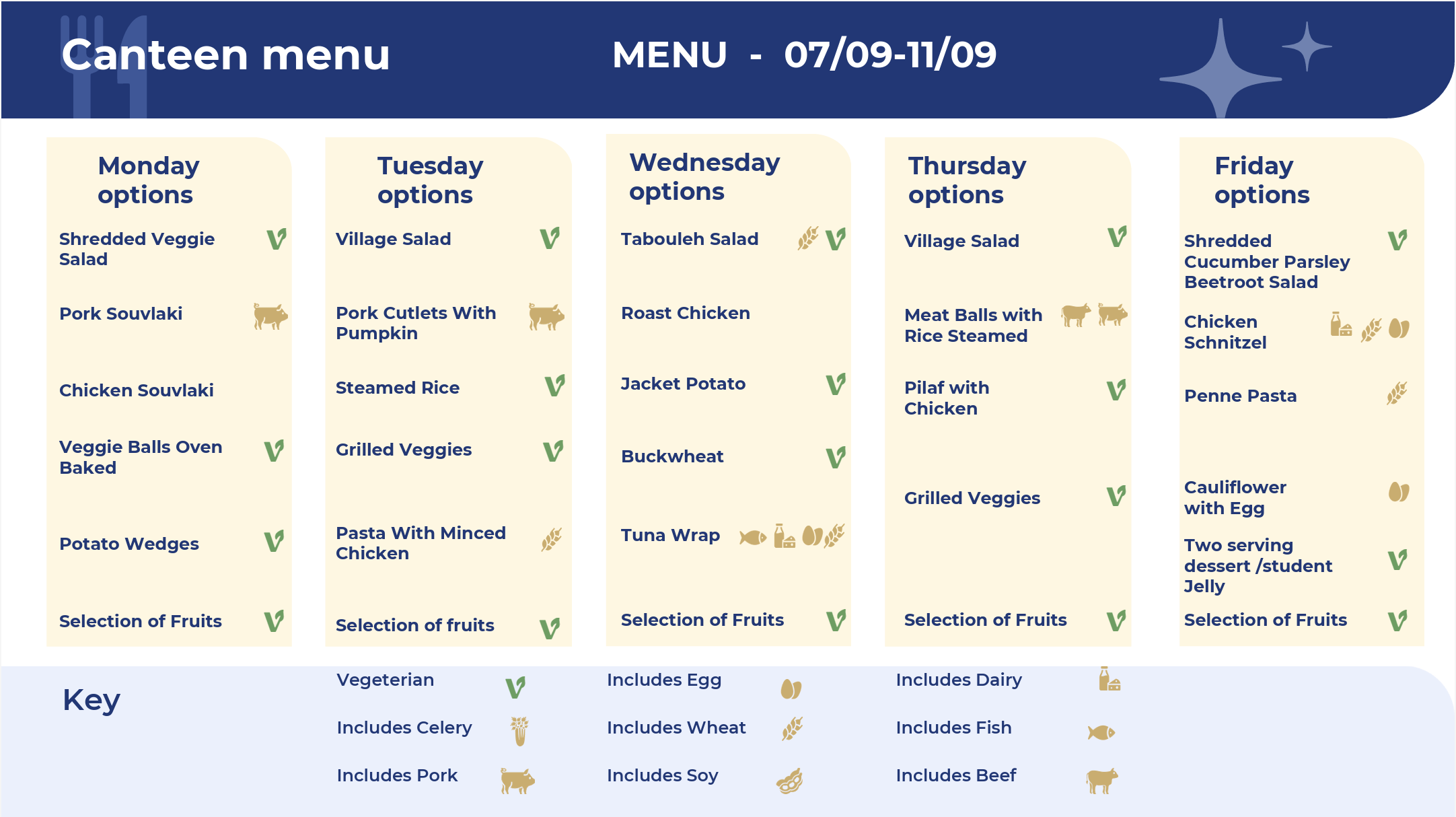
Canteen

Monthly menus will be sent via the Clipboard app, a sample is available below.

The Clipboard app can be accessed here. The canteen will open from 7 September.

Orders and payment are made on the app – how to log into the application can be found in the Clipboard Section.

If your child eats from the canteen without pre-ordering, you will be asked to pay.

Canteen Menu

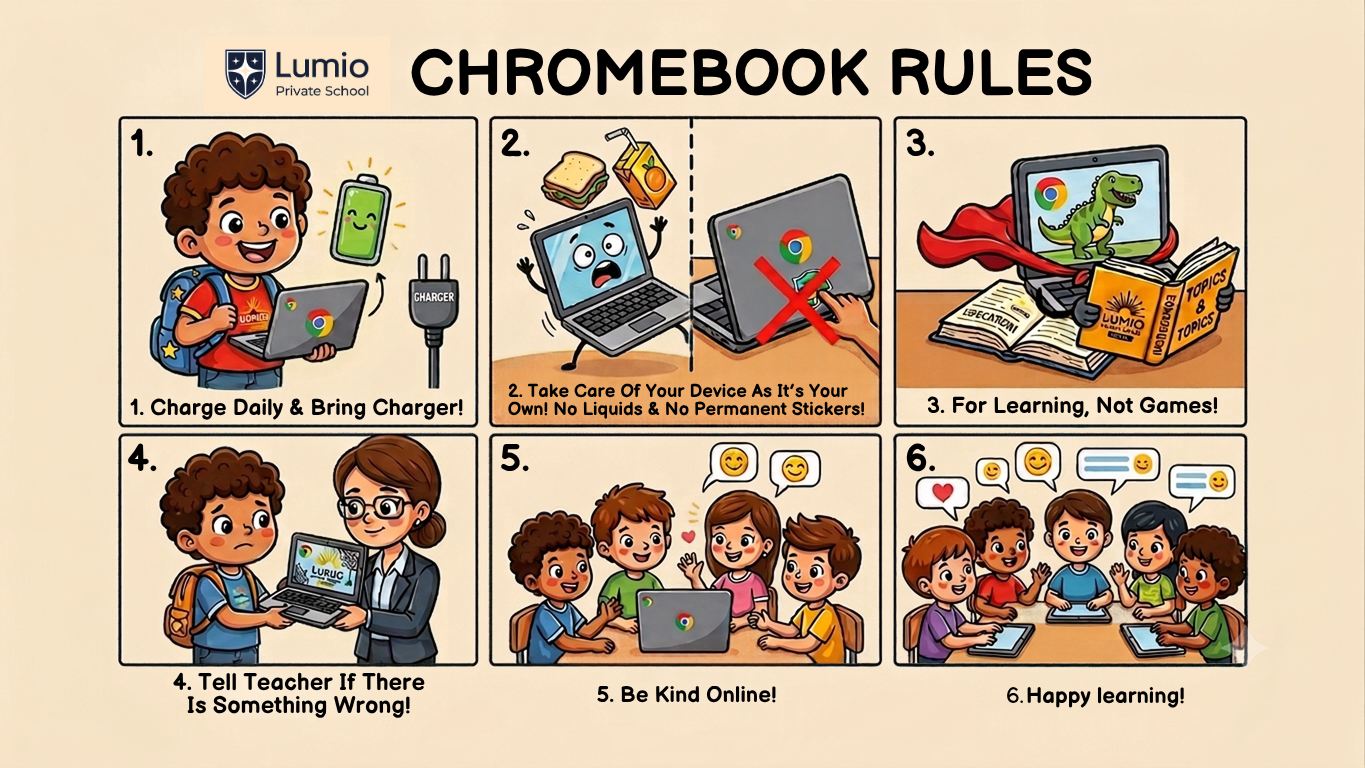
Tablets and Chromebooks

Our school provides both tablets and Chromebooks for your children, parents do not need to purchase these directly from a shop.

  • Grades 1–3: School tablets (stay at school)
  • Grades 4–10: Chromebook rental (can be taken home) – returned to the school when your child leaves.

Please read our IT Acceptable Use Policy – Available on Managebac

Bus Transportation

Our approved provider is Aeria Travel – www.aeriatravel.com

To register and find out more about the routes please contact the transport company directly:

Zone 1

  • Paphos Municipality (including Universal area)
  • Geroskipou
  • Timi village
  • Mandria village
  • Secret Valley
  • Aphrodite Hills

Zone 2 

  • Chlorakas Village
  • Kissonerga Village
  • Emba Village
  • Tremithousa Village
  • Tala Village

Zone 3

  • Coral Bay

Zone 4

  • Pegeia Village
  • St. George Pegeia – Cap St. Georges

Contact details
Email: bookings@aeriatravel.com or yiannisaeria@gmail.com
Tel: +357 26 813 971
Mobile: +357 99 647 638

It is the responsibility of the bus company to ensure the safety and wellbeing of the pupils on the bus.

Please let the company know if your child will NOT be on the bus for any specific day.

Terms and conditions are available directly from the Bus Company.

Mobile Use in school

Pupils are not allowed to bring their mobile phones to school, if they have done so they must leave them with a member of staff at the Main Office Reception desk. Pupils may collect them at the end of the school day – all phones will be switched off.

If a pupil is found using a mobile phone during any time of the school day including breaks, this will be confiscated, switched off and held at reception until the end of the day.
The Mobile Phone policy can be found in the Behavioural Policy which is available on Managebac.

Menu Sample

School Trips

At Lumio Private School, we believe in the transformative power of experiential learning. School trips enrich our students’ understanding by connecting real-world experiences to the curriculum, making learning meaningful and relevant to their daily lives.

Day Trips
Off-site visits are thoughtfully integrated into our curriculum to enhance pupil learning. Prior to any trip, parents will receive detailed information via Clipboard. This will include the trip’s purpose, transportation arrangements, and any admission fees. Parents are required to confirm their child’s attendance and complete any necessary payments through the platform.

Residential Trips
Residential trips are designed to provide pupils with immersive learning opportunities. For these trips, parents must ensure their child has a valid passport or ID and adequate medical insurance.

Key Details for All Trips:

  • A designated trip leader will be assigned for each visit, and their contact details will be shared with parents.
  • All trips include a designated First Aider, ensuring prompt care in case of any medical needs.
  • Comprehensive risk assessments are conducted to ensure the safety and well-being of all participants.
  • Participation in trips is voluntary in the primary school but mandatory in secondary as it forms part of the curriculum.
  • Pupils are expected to maintain the highest behavioural standards during these experiences.
  • The Educational Trip Policy can be found on Managebac.

We are proud to offer these opportunities, fostering growth, curiosity, and real-world connections that bring classroom learning to life.

Lost Property

Any items lost at school will be kept until the school holiday periods, these can be found in front of the Main Office Reception. After this time period all items will be donated to a charity.

Please do NOT allow your child to bring any valuables to school, we cannot be responsible for any loss of these items.

Please LABEL all items being brought into school including clothing, lunch boxes, water bottles, sport equipment, school bags, etc.

Parent Association Group

The Lumio Private School Parent Association Group (PAG) is a cornerstone of our school community, fostering a strong partnership between parents, staff, and the Founder. The PAG’s mission is to collaborate with school leadership to nurture a culture of mutual respect and shared purpose. It serves as a vital platform to communicate the School’s Vision, Mission, and Values to our current community as well as prospective families.

PAG Role:

  • Liaison between parents and school.
  • Supports community and events.
  • Promotes inclusion and teamwork.
  • Strengthens communication.

Get Involved:
Apply to be a PAG class representative (Grades 1-10) for 2025-26, contact our Parent Engagement Representative o.burmistrova@lumio.school. Each class needs at least one parent volunteer committed to meetings and Lumio’s values. If multiple applicants, a committee (Head of School, PER) will select.

Why Join?

  • Build school connections
  • Contribute to school life
  • Support dialogue and collaboration

The PAG is an essential part of the Lumio Private School community, driving collaboration, promoting inclusivity, and ensuring that our school remains a place where all voices are heard and valued.

Traffic Guidelines

The roads surrounding our school are subject to high-speed limits (up to 80 km/h), requiring strict adherence to traffic rules to ensure the safety of all community members.

Entry and Exit Instructions: From Paphos: Access the school via the Kyklikos Komvos Sfageiou Roundabout (near the Mammography clinic). Turn left into the school.

From the Airport: Continue to the roundabout and turn back towards the school to enter from the left-hand side.
Important: Avoid making right-hand turns into or out of the school as it is both illegal and hazardous.

On-Site Traffic Flow: Upon entering the school grounds, proceed to the small roundabout and follow the designated one-way system.

Parking: You may park and walk your child to class, or allow older children to walk themselves.

Drop-Off Zones: Use the drop-off area for quick exits to maintain traffic flow.

Pedestrian Safety: Please be aware of our children as they cross the pedestrian walkways. Walkways and a pedestrian crossing are available for safe access.

Exiting the School: Turn left towards the airport. To return to Paphos, use alternative routes or safe turnaround points.

Do NOT park in the drop-off zones, demarcated bus areas or on the main road of the school which leads to the Primary and Secondary parking.

Contacting the school

Accessible Communication at Lumio Private School

We are committed to providing parents with accessible and efficient communication channels. Please note that during school hours, teachers are fully engaged in teaching and are not available to take phone calls or messages. However, our Reception team is happy to assist by forwarding any messages to the relevant staff member, who will respond as soon as they are available.

To ensure seamless communication, we kindly ask that you keep your contact details up to date.

Question Title Contact Email
HEAD OF SCHOOL – MEET AND GREET: Ms Barbara every Tuesday and Friday morning before school starts.  

OPEN DOOR: Monday, Wednesday and Thursday. Unavailable at these times: Book a meeting at the Main Office Reception desk.

Medical: Information regarding your child’s health or administration of medication. School Nurse Antonia Charalambous  nurse@lumio.school
Academic questions: We encourage you to talk directly with the Class/Homeroom or subject teachers.

Homework / subject specific / academic concerns, etc.

Class/Subject Teacher Student’s homeroom or subject teacher

If there is no response (24 – 48 hours), contact info@lumio.school.

Teachers email –

Initial.lastname@lumio.school e.g. d.mcmanus@lumio.school

Primary: Specific questions / concerns relating to teaching staff Head of Primary Karen Williamson HOP@lumio.school
Middle Years Programme: Specific questions / concerns relating to teaching staff MYP Coordinator Marcella Nazzal MYP@lumio.school
Diploma Programme: Specific questions / concerns relating to teaching staff DP Coordinator Andreas Economou DP@lumio.school
Concerns; Ideas / suggestions;

Positive comments; Parent Association Group (PAG); School queries.

Parent Engagement Representation Olga Burmistrova o.burmistrova@lumio.school

+357 99 277 503

Serious queries / University and Career Counselling (secondary) Head of School / Career Guidance Counsellor Barbara Battaglino info@lumio.school
Wellbeing & Additional Needs: Wellbeing / counselling  / IEP’s / SEN Wellbeing and Additional Needs Lead Aurelija Paskevic wellbeing@lumio.school
Attendance – late, illness, medical, family emergency, religious events, travel, bereavement, etc; Pupil Attendance Slip;

School calendar dates;

School events;

Pick-up arrangements;

Teaching staff messages;

SLT meeting requests only – not teaching staff.

Clipboard: After-School Programme, Trips, and Canteen queries.

Front office and Attendance Manager

After-School Programme Administrative Assistant

Hollee Reading

Hannah Barnes

info@lumio.school

+357 26 44 3003

asp@lumio.school

 08:00 – 16:30

Absences / Attendance Front office / Homeroom teacher  Hollee Reading

Hannah Barnes

info@lumio.school
Managebac / Attendance
Marketing & Comms: Parent bulletins;  Student achievements;  Updates on student achievements;

Stories to add to our parent updates; Social media; Photo and video consent updates; Marketing suggestions.

Head of Marketing and Admissions Denise McManus d.mcmanus@lumio.school
Admissions: Change of personal details; Tours;

Assessments; Enrolments;

Withdrawals; Re-enrolment;

Applications for the next academic year; How to use the OpenApply Application.

Enrolment confirmation for migration office

Admissions Manager

PER

Anastasiya Makaranka

Olga Burmistrova

admissions@lumio.school

+357 99 375 429

Finance: School fee queries / invoices Finance Manager Olga Komenko finance@lumio.school
Admissions Portal

Thank you for your cooperation in helping us maintain effective communication within our school community.

Keep up to date with our events and activities by subscribing to our Social Media accounts:

 Facebook           Instagram               TikTok                 LinkedIn                 YouTube

Parent Portals

Academic Portal
ASP bookings
Canteen orders
Admissions Portal
Close Menu

This will close in 0 seconds